Local-first by default  ·  Cloud workspaces only when you enable them  ·  Your work is not used for training  ·  Free to start

Start your game in Avori, Unity, Godot, or Unreal

Describe your idea in ordinary language. Build a bounded first playable inside Avori, start a new project in your preferred engine, or connect the project you already have. You review the design and proposed changes before Avori builds.

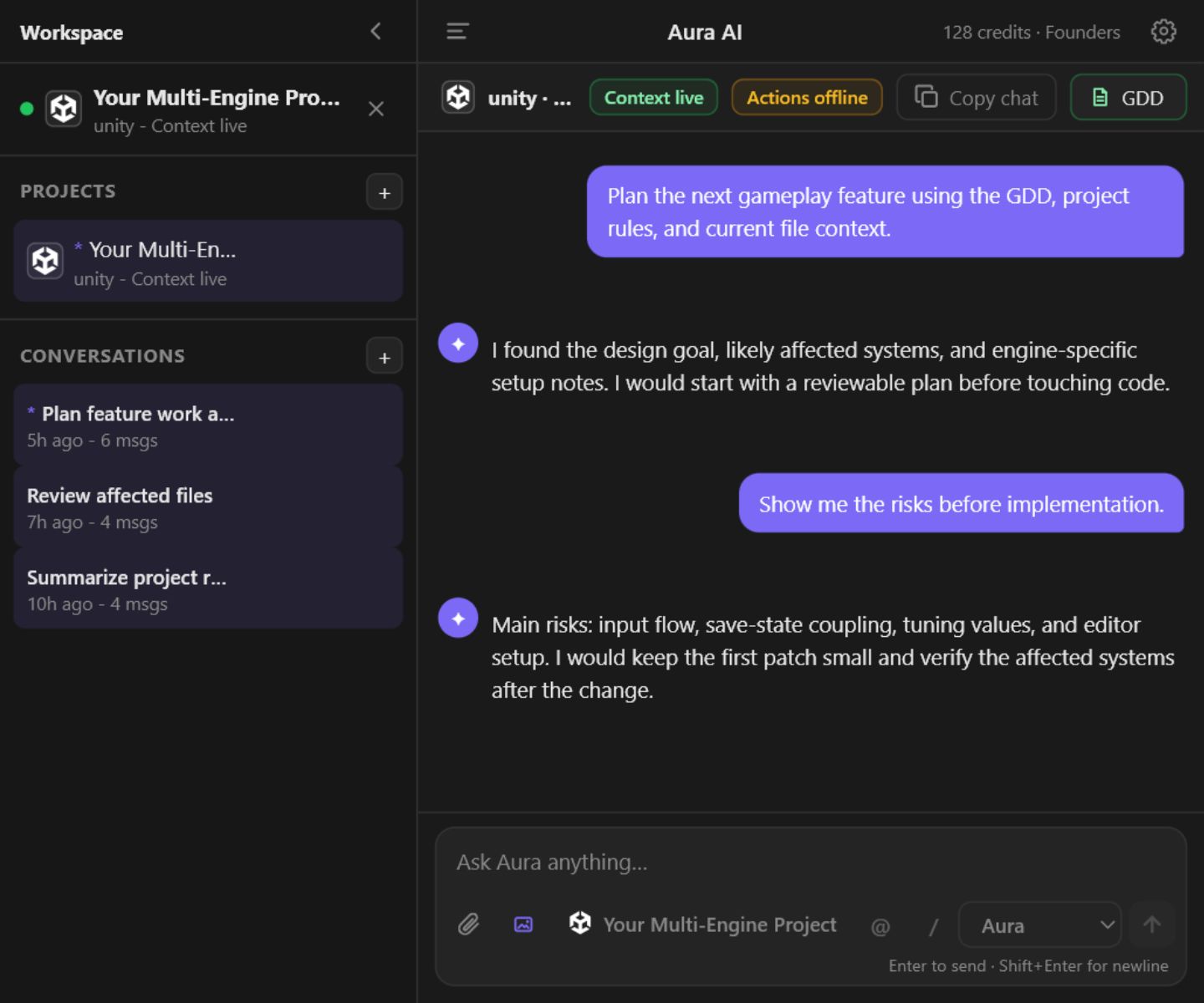
Avori project-aware chat for a connected game project
Real Avori panel view using project and GDD context.

Choose the starting point that matches your game

You do not need an existing engine project to start. Unity, Godot, and Unreal remain optional destinations and integrations that are installed separately from Avori.

01 No engine required

Build inside Avori

Describe a 2D or 3D idea, review a bounded first-playable design, and build a version you can play directly in Avori. Keep revising it there or move it into an engine later.

  • Starts from an idea, not a codebase
  • Uses your selected model funding
  • Creates a first playable, not a finished commercial game
02 Engine installed separately

Start a new game in an engine

Choose an installed Unity, Godot, or Unreal version and a project location. Avori shows the project-creation plan before it creates files or opens the editor.

  • Start with an ordinary-language game idea
  • Review the first-playable scope before creation
  • Build through supported native engine actions
03 Bring your current work

Connect an existing project

Select a Unity, Godot, or Unreal project you already have. Avori separates project context from action readiness, then lets you ask a safe question before proposing any change.

  • See when context is live and actions are ready
  • Review proposed changes before they run
  • Verify the result and keep a rollback path

Avori Core is $0 software. Start with 30 one-time trial credits. Continue with prepaid Avori Balance for supported Avori-hosted models. Avori never charges or changes funding automatically unless you turn on auto-reload. Understand model funding.

Paste a design slice. See the system Avori would build.

Try the lightweight web parser with a few paragraphs from your GDD. Avori maps mechanics, entities, goals, and technical hooks into the same kind of structure it uses before touching your project.

Runs in your browser. Export, code generation, and Hub download require an Avori account.

Ready

Click Map GDD Text to preview the mechanic graph.

Go deeper after you choose a starting path

Learn how Avori handles engine-specific work, GDD-driven implementation, prototyping, and project-aware development without treating an existing engine project as a prerequisite.

Up and running in minutes

1

Install Avori

Download Avori for Windows today. macOS support is coming soon. Avori runs locally in the background and connects to your editor.

2

Choose how to begin

Build inside Avori, start a new native engine project, or connect one you already have. Unity, Godot, and Unreal are optional and installed separately.

3

Start building

Describe the result you want in ordinary language. Review the design and proposed actions, approve the work you want, then play or verify the real result.

Built for the real complexity of game dev

Help grounded in the context Avori can actually see

Avori can use the project structure, selected files, editor context, rules, GDD, and project memory that are available for the current workflow. It uses that context to explain, plan, write, refactor, and debug work in C#, GDScript, C++, and supported visual workflows.

  • Ask questions before allowing any project change
  • Turn a requirement or error into a reviewable plan
  • Use project rules and retrieved GDD context when they are relevant
  • Engine and IDE support is qualified independently; available context differs by workflow
Illustrative example — review the real proposal in Avori
- patrolRadius = 5f;
+ patrolRadius = enemyData.patrolRadius;
↳ Reads from EnemyScriptableObject,
  consistent with PlayerController pattern.

Review supported actions before they run

Describe the result you want and Avori can propose supported project or engine actions. Review the scope before approval, watch the work as it runs, and verify the result. Engine coverage and recovery options differ by workflow, so keep normal version-control discipline for production work.

  • Connected-project Local Loops are available in Unity, Godot, and Unreal
  • Actions are capability-aware and are not identical across engines
  • Pause, resume, stop, checks, and recovery are shown according to the active workflow
  • Use native undo, Avori recovery, or source control as the workflow supports
Illustrative workflow — exact actions depend on the connected engine
✓ Step 1 — Created EnemyAI (Empty GameObject)
✓ Step 2 — Attached NavMeshAgent + EnemyController.cs
✓ Step 3 — Added Rigidbody, CapsuleCollider, tag "Enemy"
📷 Scene captured — verifying layout…
✓ Step 4 — Saved as Assets/Prefabs/EnemyAI.prefab
✅ Complete in 4 steps

Bring design intent into the current task

Add supported PDF, DOCX, Markdown, or text design documents. Avori can retrieve relevant passages for questions and plans, and it can surface reviewable GDD updates as the project changes. It does not claim to read every document perfectly or rewrite design decisions silently.

  • Retrieve relevant GDD context for questions and plans
  • Compare implementation evidence with stated design intent where supported
  • Keep a reviewed art direction consistent across characters, worlds, animation, effects, UI, and later revisions
  • Use named works as optional principle references without copying their characters, maps, interface, or assets
  • Review or reject proposed living-GDD updates
  • Unlimited local projects and GDDs on Avori Core
Illustrative GDD retrieval example

"Enemy patrol radius should scale with difficulty tier. Base: 12 units. Elite: 20 units."

⚠ Implementation mismatch detected in EnemyController.cs

Works in your engine, your IDE, your workflow

Avori includes its supported engine plugins and IDE extensions in the Windows installer. Connect a project to deploy the applicable integration. Engines and editors are installed separately, and Engine and IDE support is qualified independently.

  • Unity, Godot 4, and Unreal Engine project integrations
  • VS Code, Visual Studio 2022, and JetBrains Rider project access
  • One shared Avori panel and Hub workflow across supported hosts
🎮 Unity Available now
🟦 VS Code Available now
🪟 Visual Studio Available now
🧠 JetBrains Rider Available now
🤖 Godot 4 Available now
⚙️ Unreal Engine 5.7 on Windows Available now

Simple, transparent pricing

Avori Core

$0/mo
  • Free local projects, GDDs, and editor integrations
  • Start with 30 one-time trial credits
  • Unlimited local projects & GDDs
  • All Engine & IDE Plugins
  • Auto model selection and Local Loops
  • Continue with prepaid Avori Balance for supported Avori-hosted models
Create Free Account

Avori Studio

$79/mo

or $790/year for 5 seats

  • Everything in Pro for every member
  • 5 seats included; add seats for $12/month or $120/year each
  • Team administration and organization funding controls
  • Approved organization keys or organization Avori Balance
  • Budgets and audit history
  • Model usage is funded separately
Create Studio workspace

Optional Avori-hosted usage

Avori Balance

$10 minimum deposit

Prepaid, custom amount, and non-expiring. Spent only when you use Avori-hosted models, and never charged automatically unless you turn on auto-reload.

Create Account

Common questions

Avori is a local-first game development app. You can start a first playable inside Avori, start a new Unity, Godot, or Unreal project, or connect an existing project. Avori helps turn an ordinary-language idea into a reviewable design and proposed work. Core work stays on your computer. If you explicitly enable Pro cloud continuity or a Cloud Loop, Avori stores or processes only the cloud data needed for that feature under the published retention controls. Your content is not used for training.

Core project files, indexes, and project memory are stored on your computer. When you ask a model for help, the necessary request context goes to the model provider you selected. If you explicitly enable Pro cloud continuity or a Cloud Loop, Avori stores or processes the cloud data required for that feature under the published controls. Your content is not used for training. Read our full security page.

Start with 30 one-time trial credits. Trial credits pay for AI work. A simple request may use one credit, while images and multi-step work may use more. Credits pay for the AI work Avori runs. After that, continue with prepaid Avori Balance for supported Avori-hosted models. Pro adds Personal BYOK access for OpenAI, Anthropic, Google, or Moonshot/Kimi keys, and your provider bills that usage directly. Avori never silently switches a BYOK request to paid Avori funding.

Unity, Godot 4, Unreal Engine 5.7 on Windows, VS Code, Visual Studio 2022+, and JetBrains Rider are supported on Core, Pro, and Studio. Install the engines and editors you want separately; Avori installs its own integration files and does not bundle an engine or private Docker worker.

Minimum versions required:

  • 🎮 Unity — 2020.3 LTS or newer (Unity 6 supported)
  • 🤖 Godot — 4.2 or newer (Godot 3 is not supported)
  • ⚙️ Unreal Engine — 5.7 on Windows (C++ project required; other versions are not currently qualified)
  • 🟦 VS Code — 1.75 or newer
  • 🪟 Visual Studio — 2022 or newer
  • 🧠 JetBrains Rider — 2023.1 or newer

See the full System Requirements in the docs.

Avori Core is $0 software with unlimited local projects and GDDs. Start with 30 one-time trial credits, with no card required. Continue with prepaid Avori Balance for supported Avori-hosted models. Personal BYOK is available with Pro, and your provider bills that usage directly.

Built privacy-first

Your project stays yours
Local Hub and project memory run on your machine
Model requests use the provider and funding source you choose
Read our security page →

Start building smarter today

Start with free Avori Core and 30 one-time trial credits. Continue with prepaid Avori Balance. Nothing is charged automatically unless you turn on auto-reload.

Get Started Create Free Account

Your game stays yours. Avori handles the tedious parts.